> ## Documentation Index
> Fetch the complete documentation index at: https://openrouter.ai/docs/llms.txt
> Use this file to discover all available pages before exploring further.
# Stripe Projects
> Add OpenRouter to your app with the Stripe Projects CLI
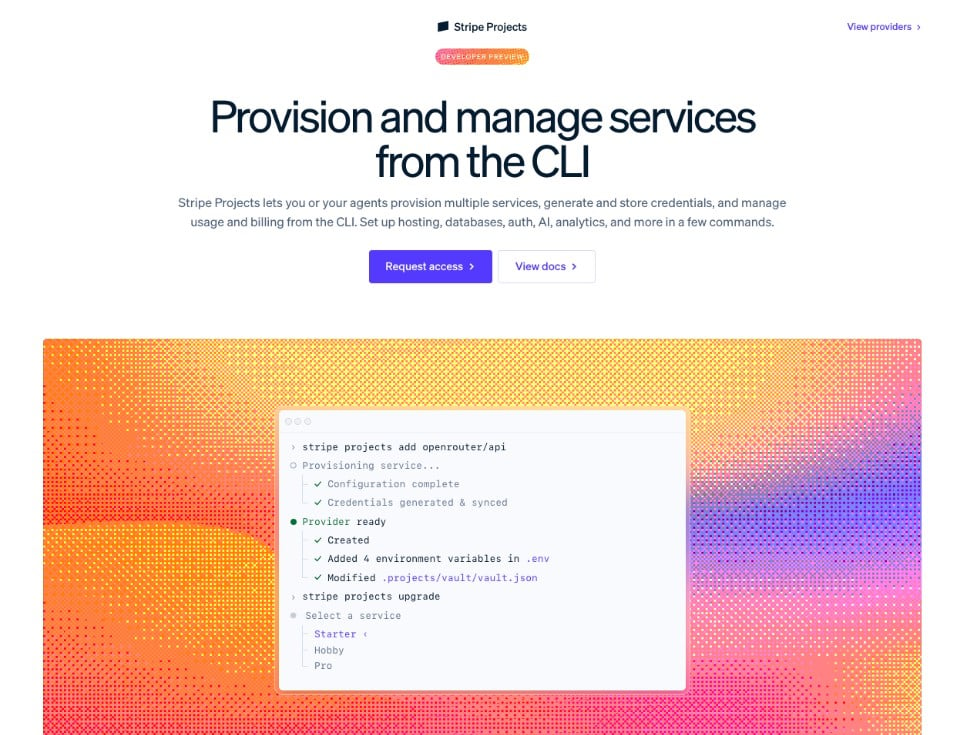
[Stripe Projects](https://projects.dev) is a CLI-based developer tool marketplace that lets you provision production-grade services (hosting, databases, auth, analytics, AI, and more) directly from your terminal. OpenRouter is a launch partner, so you can add AI model access to any project with a single command. Browse the full catalog at [projects.dev/providers](https://projects.dev/providers) and read Stripe's docs at [docs.stripe.com/stripe-projects](https://docs.stripe.com/stripe-projects).
 ## Why use Stripe Projects with OpenRouter?
* **One command to get started.** `stripe projects add openrouter/api` provisions an OpenRouter account, generates an API key, and syncs it to your `.env` file automatically.
* **Unified billing.** Manage all your infrastructure costs (hosting, database, AI) through a single Stripe account.
* **Credential management.** API keys are stored in Stripe's encrypted vault and synced to your local environment. Rotate credentials without touching your codebase.
* **Agent-friendly.** Stripe Projects writes skill files into your project directory, so coding agents can provision and configure services on your behalf.
## Prerequisites
1. A [Stripe account](https://dashboard.stripe.com/register)
2. The [Stripe CLI](https://docs.stripe.com/stripe-cli) installed and up to date
3. The Projects plugin installed:
```bash lines theme={null}
stripe plugin install projects
```
## Quick start
### Browse the catalog
List every provider or filter down to OpenRouter before installing:
```bash lines theme={null}
# All providers
stripe projects catalog
# Just OpenRouter's services and plans
stripe projects catalog openrouter
```
You can also browse the web directory at [projects.dev/providers](https://projects.dev/providers).
### Add OpenRouter to your project
If you already have a Stripe project initialized, add OpenRouter in one step:
```bash lines theme={null}
stripe projects add openrouter/api
```
This provisions an OpenRouter account (or links your existing one), generates an API key, and syncs OpenRouter's environment variables to your `.env` file. By default the service is provisioned on the **Free** plan. See [Plans and billing](#plans-and-billing) below to upgrade.
### Start from scratch
If you're starting a new project, initialize it first:
```bash lines theme={null}
# Initialize a new Stripe project
stripe projects init my-app
# Add OpenRouter
stripe projects add openrouter/api
```
### Verify your setup
After adding OpenRouter, confirm everything is working:
```bash lines theme={null}
# Check project status
stripe projects status
# Test the API key
curl https://openrouter.ai/api/v1/chat/completions \
-H "Content-Type: application/json" \
-H "Authorization: Bearer $OPENROUTER_API_KEY" \
-d '{
"model": "~openai/gpt-mini-latest",
"messages": [{"role": "user", "content": "Hello!"}]
}'
```
## What gets provisioned
When you run `stripe projects add openrouter/api`, the following happens:
1. **Account creation or linking.** Stripe Projects finds your OpenRouter account by email or creates a new one automatically. See [Account linking](#account-linking) for details on each path.
2. **API key generation.** A dedicated API key (`sk-or-v1-...`) is minted and labeled **"Provisioned by Stripe"** so it's easy to identify alongside your other keys at [openrouter.ai/settings/keys](https://openrouter.ai/settings/keys).
3. **Environment sync.** The following variables are stored in Stripe's encrypted vault and written to your project's `.env`:
```bash lines theme={null}
OPENROUTER_API_KEY=sk-or-v1-...
OPENROUTER_TYPE=bearer
```
Your API key works with the full [OpenRouter API](/docs/quickstart), giving you access to 400+ AI models through a single endpoint.
## Service details
| | |
| ------------ | ------------------------------------------------------------------------------ |
| **Provider** | OpenRouter |
| **Service** | `openrouter/api` |
| **Category** | AI |
| **Plans** | `free` (no credit card required) or `pay-as-you-go` (per-token usage pricing) |
| **Pricing** | Per-token, varies by model. See [model pricing](https://openrouter.ai/models). |
### Choose a plan
`stripe projects add openrouter/api` prompts you to choose between the **Free** and **Pay-as-you-go** plans when you provision. The Free plan works without a payment method. To switch plans later, use `stripe projects upgrade` or `stripe projects downgrade`:
```bash lines theme={null}
# Move an existing resource to pay-as-you-go
stripe projects upgrade openrouter/api
# Move back to the free plan
stripe projects downgrade openrouter/api
```
## Managing your OpenRouter service
Stripe's `remove` and `rotate` commands accept either the local resource name (e.g. `openrouter-api`) or the `/` reference. Use `stripe projects services list` to see the exact resource names in your project.
### Rotate credentials
If you need to rotate your API key (for example, after a team member leaves):
```bash lines theme={null}
stripe projects rotate openrouter/api
```
This generates a new API key, disables the old one, and updates your `.env` file automatically.
### Remove the service
To remove OpenRouter from your project and revoke the API key:
```bash lines theme={null}
stripe projects remove openrouter/api
```
Add `--only-credentials` to forget the local resource without deprovisioning it on OpenRouter's side.
### Sync environment variables
List the project's environment variables (values are hidden):
```bash lines theme={null}
stripe projects env
```
If your `.env` file gets out of sync, pull the latest credentials:
```bash lines theme={null}
stripe projects env --pull
```
### Open the OpenRouter dashboard
Jump straight to your OpenRouter dashboard from the CLI:
```bash lines theme={null}
stripe projects open openrouter
```
## Account linking
Stripe Projects resolves your OpenRouter account by the email on your Stripe account:
* **No existing OpenRouter account.** A new account is created inline and credentials are returned directly from the provisioning call. No browser pop-up.
* **Existing OpenRouter account.** Stripe and OpenRouter complete a headless OAuth 2.0 code exchange (against `POST /api/v1/provisioning/oauth/token`) to link your account. No browser pop-up in the common case.
* **Fallback.** In rare cases (for example, an idempotent replay before linking completes), you'll be prompted to open a browser to finish authorizing the connection. Once linked, the association persists across projects in the same Stripe account.
## Plans and billing
OpenRouter ships with two plans through Stripe Projects:
* **Free.** Access free AI models at zero cost. No payment method required.
* **Pay-as-you-go.** Per-token pricing across 400+ models with no minimum commitment. See [openrouter.ai/models](https://openrouter.ai/models) for rates.
When you choose a paid plan, Stripe tokenizes your Stripe-stored payment credentials into a [Shared Payment Token](https://docs.stripe.com/agentic-commerce/concepts/shared-payment-tokens) and grants OpenRouter a payment credential scoped to that upgrade. Your underlying card/bank details are never shared directly.
Manage your payment method on Stripe's side:
```bash lines theme={null}
# View the payment method on file
stripe projects billing show
# Add or update a payment method
stripe projects billing add
```
## Using with coding agents
Stripe Projects is designed to work with coding agents. When you initialize a project, Stripe writes skill files into your project directory so agents can provision and manage services using the same deterministic CLI.
Example prompts for your agent:
* *"Add OpenRouter to this project so I can call AI models."*
* *"Rotate my OpenRouter API key."*
* *"What AI services are available in the Stripe Projects catalog?"*
To avoid browser pop-ups during agent-driven provisioning, complete the following flow manually **before** starting your agent session:
```bash lines theme={null}
stripe login
stripe projects link openrouter
stripe projects billing add # only if you plan to use pay-as-you-go
```
Then let the agent call `stripe projects add openrouter/api`.
For fully non-interactive provisioning (CI, scripts, agents), pass `--json --yes`:
```bash lines theme={null}
stripe projects add openrouter/api --json --yes
```
To give your agent a combined, up-to-date context document for every provider in your project (including OpenRouter's quickstart, models, and SDK skills), run:
```bash lines theme={null}
stripe projects llm-context
```
## Next steps
* [Quickstart](/docs/quickstart). Learn the basics of calling the OpenRouter API.
* [Models](https://openrouter.ai/models). Browse 400+ available models and compare pricing.
* [API key rotation](/docs/cookbook/administration/api-key-rotation). Best practices for credential management.
* [Guardrails](/docs/guides/features/guardrails). Set spending limits and model restrictions.
* [Provider selection](/docs/guides/routing/provider-selection). Control which providers handle your requests.
## Why use Stripe Projects with OpenRouter?
* **One command to get started.** `stripe projects add openrouter/api` provisions an OpenRouter account, generates an API key, and syncs it to your `.env` file automatically.
* **Unified billing.** Manage all your infrastructure costs (hosting, database, AI) through a single Stripe account.
* **Credential management.** API keys are stored in Stripe's encrypted vault and synced to your local environment. Rotate credentials without touching your codebase.
* **Agent-friendly.** Stripe Projects writes skill files into your project directory, so coding agents can provision and configure services on your behalf.
## Prerequisites
1. A [Stripe account](https://dashboard.stripe.com/register)
2. The [Stripe CLI](https://docs.stripe.com/stripe-cli) installed and up to date
3. The Projects plugin installed:
```bash lines theme={null}
stripe plugin install projects
```
## Quick start
### Browse the catalog
List every provider or filter down to OpenRouter before installing:
```bash lines theme={null}
# All providers
stripe projects catalog
# Just OpenRouter's services and plans
stripe projects catalog openrouter
```
You can also browse the web directory at [projects.dev/providers](https://projects.dev/providers).
### Add OpenRouter to your project
If you already have a Stripe project initialized, add OpenRouter in one step:
```bash lines theme={null}
stripe projects add openrouter/api
```
This provisions an OpenRouter account (or links your existing one), generates an API key, and syncs OpenRouter's environment variables to your `.env` file. By default the service is provisioned on the **Free** plan. See [Plans and billing](#plans-and-billing) below to upgrade.
### Start from scratch
If you're starting a new project, initialize it first:
```bash lines theme={null}
# Initialize a new Stripe project
stripe projects init my-app
# Add OpenRouter
stripe projects add openrouter/api
```
### Verify your setup
After adding OpenRouter, confirm everything is working:
```bash lines theme={null}
# Check project status
stripe projects status
# Test the API key
curl https://openrouter.ai/api/v1/chat/completions \
-H "Content-Type: application/json" \
-H "Authorization: Bearer $OPENROUTER_API_KEY" \
-d '{
"model": "~openai/gpt-mini-latest",
"messages": [{"role": "user", "content": "Hello!"}]
}'
```
## What gets provisioned
When you run `stripe projects add openrouter/api`, the following happens:
1. **Account creation or linking.** Stripe Projects finds your OpenRouter account by email or creates a new one automatically. See [Account linking](#account-linking) for details on each path.
2. **API key generation.** A dedicated API key (`sk-or-v1-...`) is minted and labeled **"Provisioned by Stripe"** so it's easy to identify alongside your other keys at [openrouter.ai/settings/keys](https://openrouter.ai/settings/keys).
3. **Environment sync.** The following variables are stored in Stripe's encrypted vault and written to your project's `.env`:
```bash lines theme={null}
OPENROUTER_API_KEY=sk-or-v1-...
OPENROUTER_TYPE=bearer
```
Your API key works with the full [OpenRouter API](/docs/quickstart), giving you access to 400+ AI models through a single endpoint.
## Service details
| | |
| ------------ | ------------------------------------------------------------------------------ |
| **Provider** | OpenRouter |
| **Service** | `openrouter/api` |
| **Category** | AI |
| **Plans** | `free` (no credit card required) or `pay-as-you-go` (per-token usage pricing) |
| **Pricing** | Per-token, varies by model. See [model pricing](https://openrouter.ai/models). |
### Choose a plan
`stripe projects add openrouter/api` prompts you to choose between the **Free** and **Pay-as-you-go** plans when you provision. The Free plan works without a payment method. To switch plans later, use `stripe projects upgrade` or `stripe projects downgrade`:
```bash lines theme={null}
# Move an existing resource to pay-as-you-go
stripe projects upgrade openrouter/api
# Move back to the free plan
stripe projects downgrade openrouter/api
```
## Managing your OpenRouter service
Stripe's `remove` and `rotate` commands accept either the local resource name (e.g. `openrouter-api`) or the `/` reference. Use `stripe projects services list` to see the exact resource names in your project.
### Rotate credentials
If you need to rotate your API key (for example, after a team member leaves):
```bash lines theme={null}
stripe projects rotate openrouter/api
```
This generates a new API key, disables the old one, and updates your `.env` file automatically.
### Remove the service
To remove OpenRouter from your project and revoke the API key:
```bash lines theme={null}
stripe projects remove openrouter/api
```
Add `--only-credentials` to forget the local resource without deprovisioning it on OpenRouter's side.
### Sync environment variables
List the project's environment variables (values are hidden):
```bash lines theme={null}
stripe projects env
```
If your `.env` file gets out of sync, pull the latest credentials:
```bash lines theme={null}
stripe projects env --pull
```
### Open the OpenRouter dashboard
Jump straight to your OpenRouter dashboard from the CLI:
```bash lines theme={null}
stripe projects open openrouter
```
## Account linking
Stripe Projects resolves your OpenRouter account by the email on your Stripe account:
* **No existing OpenRouter account.** A new account is created inline and credentials are returned directly from the provisioning call. No browser pop-up.
* **Existing OpenRouter account.** Stripe and OpenRouter complete a headless OAuth 2.0 code exchange (against `POST /api/v1/provisioning/oauth/token`) to link your account. No browser pop-up in the common case.
* **Fallback.** In rare cases (for example, an idempotent replay before linking completes), you'll be prompted to open a browser to finish authorizing the connection. Once linked, the association persists across projects in the same Stripe account.
## Plans and billing
OpenRouter ships with two plans through Stripe Projects:
* **Free.** Access free AI models at zero cost. No payment method required.
* **Pay-as-you-go.** Per-token pricing across 400+ models with no minimum commitment. See [openrouter.ai/models](https://openrouter.ai/models) for rates.
When you choose a paid plan, Stripe tokenizes your Stripe-stored payment credentials into a [Shared Payment Token](https://docs.stripe.com/agentic-commerce/concepts/shared-payment-tokens) and grants OpenRouter a payment credential scoped to that upgrade. Your underlying card/bank details are never shared directly.
Manage your payment method on Stripe's side:
```bash lines theme={null}
# View the payment method on file
stripe projects billing show
# Add or update a payment method
stripe projects billing add
```
## Using with coding agents
Stripe Projects is designed to work with coding agents. When you initialize a project, Stripe writes skill files into your project directory so agents can provision and manage services using the same deterministic CLI.
Example prompts for your agent:
* *"Add OpenRouter to this project so I can call AI models."*
* *"Rotate my OpenRouter API key."*
* *"What AI services are available in the Stripe Projects catalog?"*
To avoid browser pop-ups during agent-driven provisioning, complete the following flow manually **before** starting your agent session:
```bash lines theme={null}
stripe login
stripe projects link openrouter
stripe projects billing add # only if you plan to use pay-as-you-go
```
Then let the agent call `stripe projects add openrouter/api`.
For fully non-interactive provisioning (CI, scripts, agents), pass `--json --yes`:
```bash lines theme={null}
stripe projects add openrouter/api --json --yes
```
To give your agent a combined, up-to-date context document for every provider in your project (including OpenRouter's quickstart, models, and SDK skills), run:
```bash lines theme={null}
stripe projects llm-context
```
## Next steps
* [Quickstart](/docs/quickstart). Learn the basics of calling the OpenRouter API.
* [Models](https://openrouter.ai/models). Browse 400+ available models and compare pricing.
* [API key rotation](/docs/cookbook/administration/api-key-rotation). Best practices for credential management.
* [Guardrails](/docs/guides/features/guardrails). Set spending limits and model restrictions.
* [Provider selection](/docs/guides/routing/provider-selection). Control which providers handle your requests.