> ## Documentation Index
> Fetch the complete documentation index at: https://openrouter.ai/docs/llms.txt
> Use this file to discover all available pages before exploring further.
# Snowflake
> Send traces to Snowflake
[Snowflake](https://snowflake.com) is a cloud data warehouse platform. OpenRouter can stream traces directly to your Snowflake database for custom analytics, long-term storage, and business intelligence.
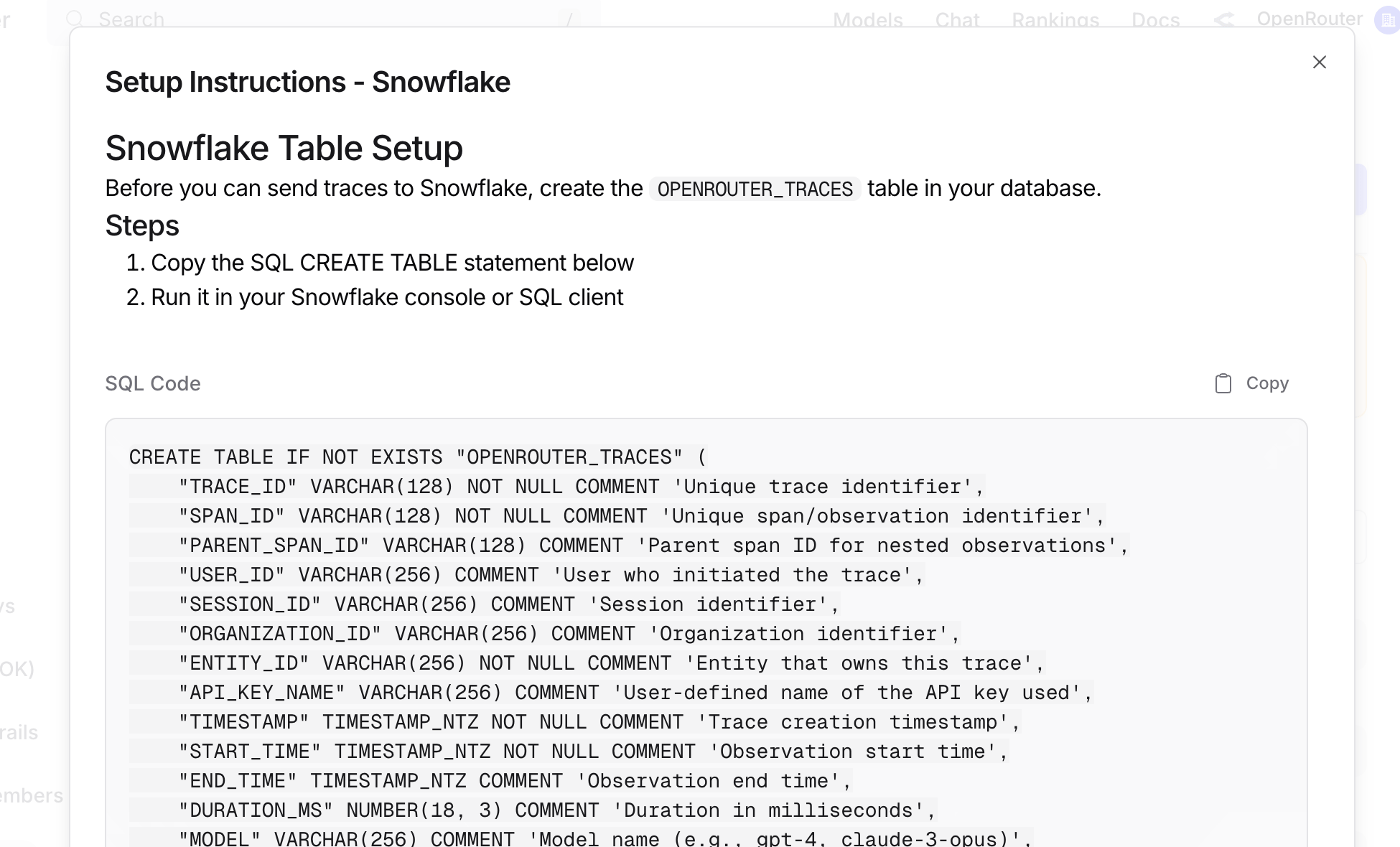
## Step 1: Create the traces table
Before connecting OpenRouter, create the `OPENROUTER_TRACES` table in your Snowflake database. You can find the exact SQL in the OpenRouter dashboard when configuring the destination:
 ## Step 2: Create access credentials
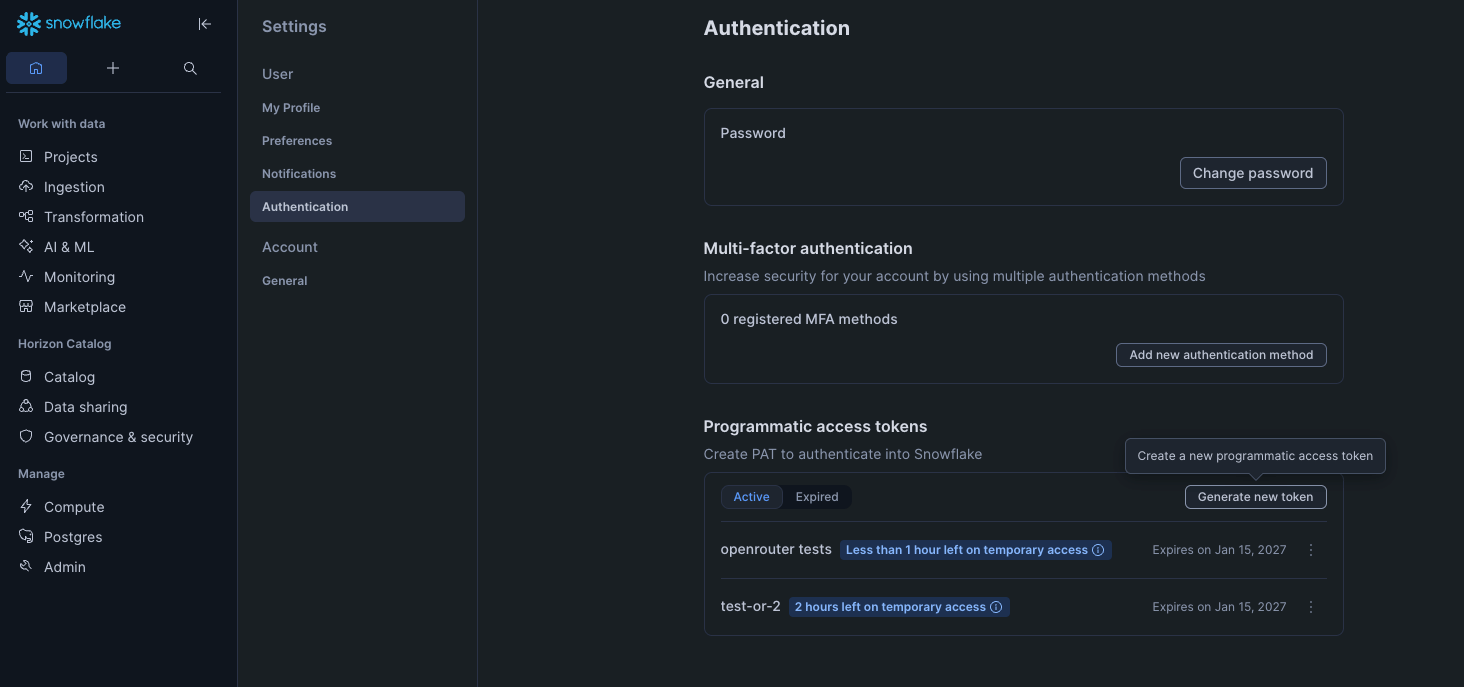
Generate a [Programmatic Access Token](https://docs.snowflake.com/en/user-guide/programmatic-access-tokens) with `ACCOUNTADMIN` permissions in the Snowflake UI under **Settings > Authentication**.
## Step 2: Create access credentials
Generate a [Programmatic Access Token](https://docs.snowflake.com/en/user-guide/programmatic-access-tokens) with `ACCOUNTADMIN` permissions in the Snowflake UI under **Settings > Authentication**.
 ## Step 3: Enable Broadcast in OpenRouter
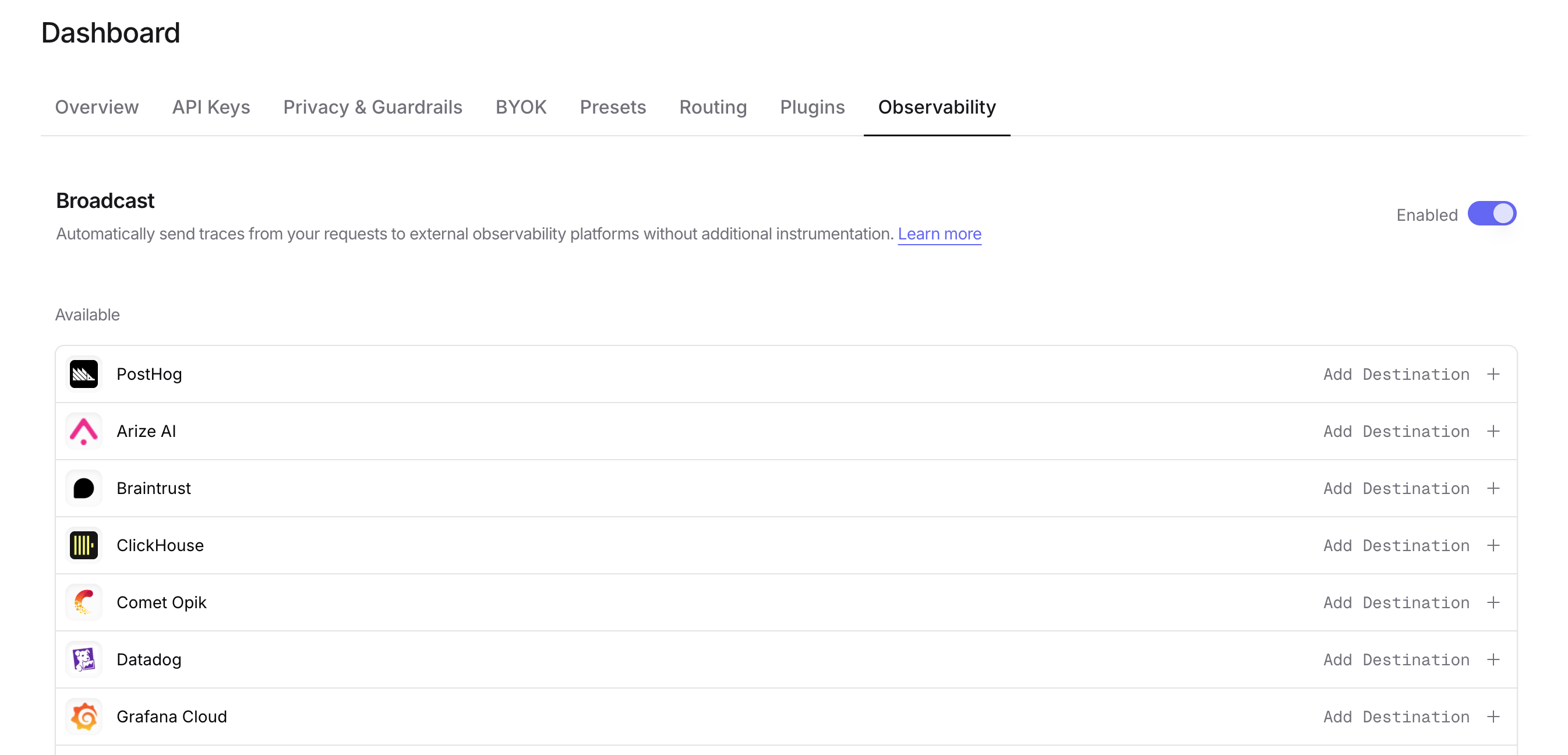
Go to [Settings > Observability](https://openrouter.ai/settings/observability) and toggle **Enable Broadcast**.
## Step 3: Enable Broadcast in OpenRouter
Go to [Settings > Observability](https://openrouter.ai/settings/observability) and toggle **Enable Broadcast**.
 ## Step 4: Configure Snowflake
Click the edit icon next to **Snowflake** and enter:
* **Account**: Your Snowflake account identifier (e.g., `eac52885.us-east-1`). You can find your account region and your account number at the end of your Snowflake instance's URL: [https://app.snowflake.com/us-east-1/eac52885](https://app.snowflake.com/us-east-1/eac52885); together these make your account identifier.
* **Token**: Your Programmatic Access Token.
* **Database**: Target database name (default: `SNOWFLAKE_LEARNING_DB`).
* **Schema**: Target schema name (default: `PUBLIC`).
* **Table**: Table name (default: `OPENROUTER_TRACES`).
* **Warehouse**: Compute warehouse name (default: `COMPUTE_WH`).
## Step 5: Test and save
Click **Test Connection** to verify the setup. The configuration only saves if the test passes.
## Step 6: Send a test trace
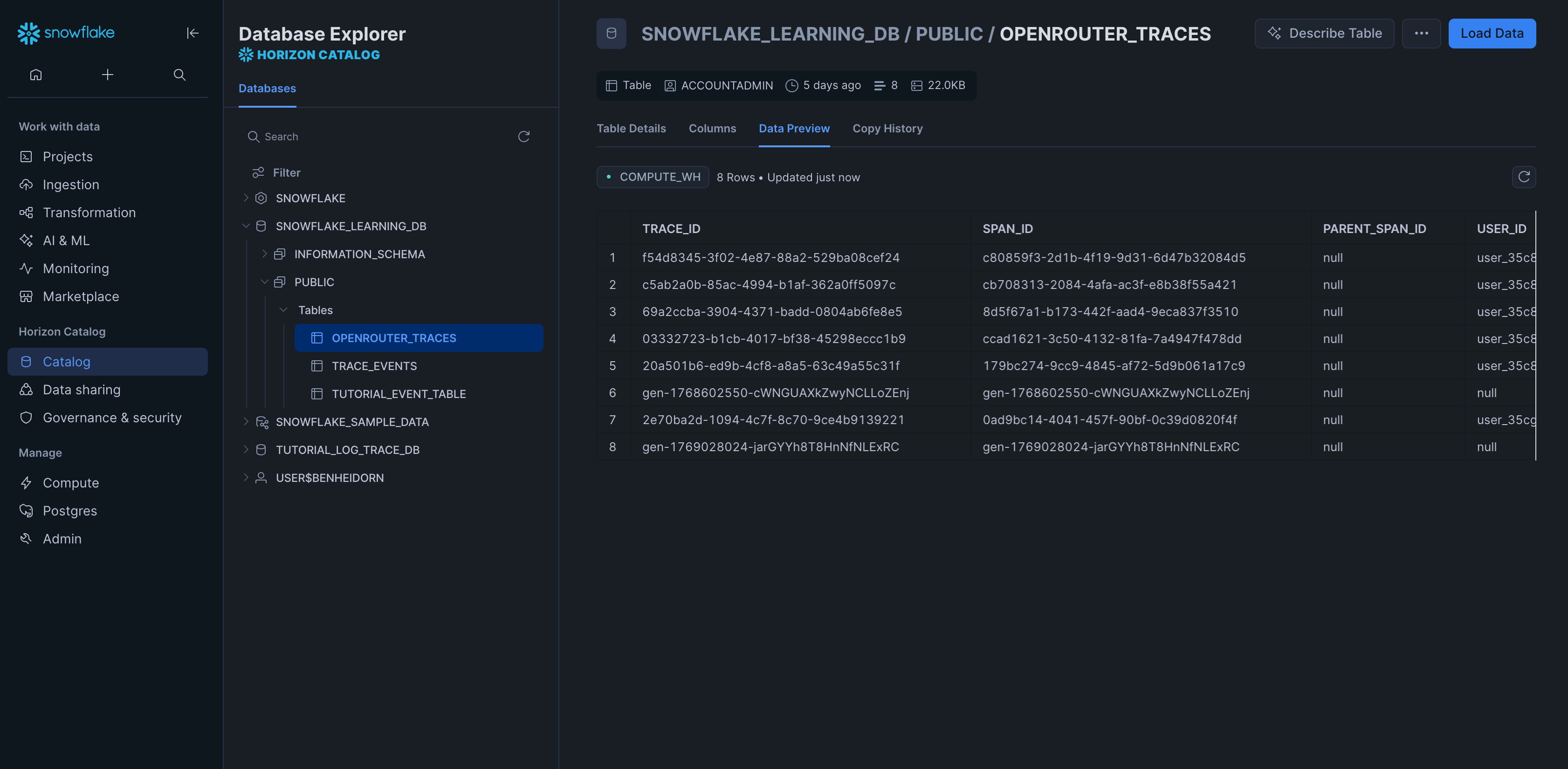
Make an API request through OpenRouter and query your Snowflake table to verify the trace was received.
## Step 4: Configure Snowflake
Click the edit icon next to **Snowflake** and enter:
* **Account**: Your Snowflake account identifier (e.g., `eac52885.us-east-1`). You can find your account region and your account number at the end of your Snowflake instance's URL: [https://app.snowflake.com/us-east-1/eac52885](https://app.snowflake.com/us-east-1/eac52885); together these make your account identifier.
* **Token**: Your Programmatic Access Token.
* **Database**: Target database name (default: `SNOWFLAKE_LEARNING_DB`).
* **Schema**: Target schema name (default: `PUBLIC`).
* **Table**: Table name (default: `OPENROUTER_TRACES`).
* **Warehouse**: Compute warehouse name (default: `COMPUTE_WH`).
## Step 5: Test and save
Click **Test Connection** to verify the setup. The configuration only saves if the test passes.
## Step 6: Send a test trace
Make an API request through OpenRouter and query your Snowflake table to verify the trace was received.
 ## Example queries
### Cost analysis by model
```sql lines theme={null}
SELECT
DATE_TRUNC('day', TIMESTAMP) as day,
MODEL,
SUM(TOTAL_COST) as total_cost,
SUM(TOTAL_TOKENS) as total_tokens,
COUNT(*) as request_count
FROM OPENROUTER_TRACES
WHERE TIMESTAMP >= DATEADD(day, -30, CURRENT_TIMESTAMP())
AND STATUS = 'ok'
AND SPAN_TYPE = 'GENERATION'
GROUP BY day, MODEL
ORDER BY day DESC, total_cost DESC;
```
### User activity analysis
```sql lines theme={null}
SELECT
USER_ID,
COUNT(DISTINCT TRACE_ID) as trace_count,
COUNT(DISTINCT SESSION_ID) as session_count,
SUM(TOTAL_TOKENS) as total_tokens,
SUM(TOTAL_COST) as total_cost,
AVG(DURATION_MS) as avg_duration_ms
FROM OPENROUTER_TRACES
WHERE TIMESTAMP >= DATEADD(day, -7, CURRENT_TIMESTAMP())
AND SPAN_TYPE = 'GENERATION'
GROUP BY USER_ID
ORDER BY total_cost DESC;
```
### Error analysis
```sql lines theme={null}
SELECT
TRACE_ID,
TIMESTAMP,
MODEL,
LEVEL,
FINISH_REASON,
METADATA as user_metadata,
INPUT,
OUTPUT
FROM OPENROUTER_TRACES
WHERE STATUS = 'error'
AND TIMESTAMP >= DATEADD(hour, -1, CURRENT_TIMESTAMP())
ORDER BY TIMESTAMP DESC;
```
### Provider performance comparison
```sql lines theme={null}
SELECT
PROVIDER_NAME,
MODEL,
AVG(DURATION_MS) as avg_duration_ms,
PERCENTILE_CONT(0.5) WITHIN GROUP (ORDER BY DURATION_MS) as p50_duration_ms,
PERCENTILE_CONT(0.95) WITHIN GROUP (ORDER BY DURATION_MS) as p95_duration_ms,
COUNT(*) as request_count
FROM OPENROUTER_TRACES
WHERE TIMESTAMP >= DATEADD(day, -7, CURRENT_TIMESTAMP())
AND STATUS = 'ok'
AND SPAN_TYPE = 'GENERATION'
GROUP BY PROVIDER_NAME, MODEL
HAVING request_count >= 10
ORDER BY avg_duration_ms;
```
### Usage by API key
```sql lines theme={null}
SELECT
API_KEY_NAME,
COUNT(DISTINCT TRACE_ID) as trace_count,
SUM(TOTAL_COST) as total_cost,
SUM(PROMPT_TOKENS) as prompt_tokens,
SUM(COMPLETION_TOKENS) as completion_tokens
FROM OPENROUTER_TRACES
WHERE TIMESTAMP >= DATEADD(day, -30, CURRENT_TIMESTAMP())
AND SPAN_TYPE = 'GENERATION'
GROUP BY API_KEY_NAME
ORDER BY total_cost DESC;
```
### Accessing VARIANT columns
```sql lines theme={null}
SELECT
TRACE_ID,
METADATA:custom_field::STRING as custom_value,
ATTRIBUTES:"gen_ai.request.model"::STRING as requested_model
FROM OPENROUTER_TRACES
WHERE METADATA:custom_field IS NOT NULL;
```
### Parsing input messages
```sql lines theme={null}
SELECT
TRACE_ID,
INPUT:messages[0]:role::STRING as first_message_role,
INPUT:messages[0]:content::STRING as first_message_content
FROM OPENROUTER_TRACES
WHERE SPAN_TYPE = 'GENERATION';
```
## Schema design
### Typed columns
The schema extracts commonly-queried fields as typed columns for efficient filtering and aggregation:
* **Identifiers**: TRACE\_ID, USER\_ID, SESSION\_ID, etc.
* **Timestamps**: For time-series analysis
* **Model Info**: For cost and performance analysis
* **Metrics**: Tokens and costs for billing
### VARIANT columns
Less commonly-accessed and variable-structure data is stored in VARIANT columns:
* **ATTRIBUTES**: Full OTEL attribute set
* **INPUT/OUTPUT**: Variable message structures
* **METADATA**: User-defined key-values
* **MODEL\_PARAMETERS**: Model-specific configurations
This design balances query performance with schema flexibility and storage efficiency.
## Custom Metadata
Custom metadata from the `trace` field is stored in the `METADATA` VARIANT column. You can query it using Snowflake's semi-structured data functions.
### Supported Metadata Keys
| Key | Snowflake Mapping | Description |
| ----------------- | --------------------------------------- | ------------------------------------ |
| `trace_id` | `TRACE_ID` column / `METADATA:trace_id` | Custom trace identifier for grouping |
| `trace_name` | `METADATA:trace_name` | Custom name for the trace |
| `span_name` | `METADATA:span_name` | Name for intermediate spans |
| `generation_name` | `METADATA:generation_name` | Name for the LLM generation |
### Example
```json lines theme={null}
{
"model": "openai/gpt-4o",
"messages": [{ "role": "user", "content": "Forecast next quarter revenue..." }],
"user": "user_12345",
"session_id": "session_abc",
"trace": {
"trace_name": "Revenue Forecasting",
"generation_name": "Generate Forecast",
"department": "finance",
"quarter": "Q2-2026",
"model_version": "v3"
}
}
```
### Querying Custom Metadata
Use Snowflake's VARIANT column syntax to query your custom metadata:
```sql lines theme={null}
SELECT
TRACE_ID,
METADATA:department::STRING as department,
METADATA:quarter::STRING as quarter,
METADATA:model_version::STRING as model_version,
TOTAL_COST,
TOTAL_TOKENS
FROM OPENROUTER_TRACES
WHERE METADATA:department IS NOT NULL
AND SPAN_TYPE = 'GENERATION'
ORDER BY TIMESTAMP DESC;
```
### Additional Context
* The `user` field maps to the `USER_ID` typed column
* The `session_id` field maps to the `SESSION_ID` typed column
* All custom metadata keys from `trace` are stored in the `METADATA` VARIANT column for flexible querying
* You can create materialized views on frequently queried metadata fields for better performance
## Privacy Mode
When [Privacy Mode](/docs/guides/features/broadcast#privacy-mode) is enabled for this destination, prompt and completion content is excluded from traces. All other trace data — token usage, costs, timing, model information, and custom metadata — is still sent normally. See [Privacy Mode](/docs/guides/features/broadcast#privacy-mode) for details.
## Example queries
### Cost analysis by model
```sql lines theme={null}
SELECT
DATE_TRUNC('day', TIMESTAMP) as day,
MODEL,
SUM(TOTAL_COST) as total_cost,
SUM(TOTAL_TOKENS) as total_tokens,
COUNT(*) as request_count
FROM OPENROUTER_TRACES
WHERE TIMESTAMP >= DATEADD(day, -30, CURRENT_TIMESTAMP())
AND STATUS = 'ok'
AND SPAN_TYPE = 'GENERATION'
GROUP BY day, MODEL
ORDER BY day DESC, total_cost DESC;
```
### User activity analysis
```sql lines theme={null}
SELECT
USER_ID,
COUNT(DISTINCT TRACE_ID) as trace_count,
COUNT(DISTINCT SESSION_ID) as session_count,
SUM(TOTAL_TOKENS) as total_tokens,
SUM(TOTAL_COST) as total_cost,
AVG(DURATION_MS) as avg_duration_ms
FROM OPENROUTER_TRACES
WHERE TIMESTAMP >= DATEADD(day, -7, CURRENT_TIMESTAMP())
AND SPAN_TYPE = 'GENERATION'
GROUP BY USER_ID
ORDER BY total_cost DESC;
```
### Error analysis
```sql lines theme={null}
SELECT
TRACE_ID,
TIMESTAMP,
MODEL,
LEVEL,
FINISH_REASON,
METADATA as user_metadata,
INPUT,
OUTPUT
FROM OPENROUTER_TRACES
WHERE STATUS = 'error'
AND TIMESTAMP >= DATEADD(hour, -1, CURRENT_TIMESTAMP())
ORDER BY TIMESTAMP DESC;
```
### Provider performance comparison
```sql lines theme={null}
SELECT
PROVIDER_NAME,
MODEL,
AVG(DURATION_MS) as avg_duration_ms,
PERCENTILE_CONT(0.5) WITHIN GROUP (ORDER BY DURATION_MS) as p50_duration_ms,
PERCENTILE_CONT(0.95) WITHIN GROUP (ORDER BY DURATION_MS) as p95_duration_ms,
COUNT(*) as request_count
FROM OPENROUTER_TRACES
WHERE TIMESTAMP >= DATEADD(day, -7, CURRENT_TIMESTAMP())
AND STATUS = 'ok'
AND SPAN_TYPE = 'GENERATION'
GROUP BY PROVIDER_NAME, MODEL
HAVING request_count >= 10
ORDER BY avg_duration_ms;
```
### Usage by API key
```sql lines theme={null}
SELECT
API_KEY_NAME,
COUNT(DISTINCT TRACE_ID) as trace_count,
SUM(TOTAL_COST) as total_cost,
SUM(PROMPT_TOKENS) as prompt_tokens,
SUM(COMPLETION_TOKENS) as completion_tokens
FROM OPENROUTER_TRACES
WHERE TIMESTAMP >= DATEADD(day, -30, CURRENT_TIMESTAMP())
AND SPAN_TYPE = 'GENERATION'
GROUP BY API_KEY_NAME
ORDER BY total_cost DESC;
```
### Accessing VARIANT columns
```sql lines theme={null}
SELECT
TRACE_ID,
METADATA:custom_field::STRING as custom_value,
ATTRIBUTES:"gen_ai.request.model"::STRING as requested_model
FROM OPENROUTER_TRACES
WHERE METADATA:custom_field IS NOT NULL;
```
### Parsing input messages
```sql lines theme={null}
SELECT
TRACE_ID,
INPUT:messages[0]:role::STRING as first_message_role,
INPUT:messages[0]:content::STRING as first_message_content
FROM OPENROUTER_TRACES
WHERE SPAN_TYPE = 'GENERATION';
```
## Schema design
### Typed columns
The schema extracts commonly-queried fields as typed columns for efficient filtering and aggregation:
* **Identifiers**: TRACE\_ID, USER\_ID, SESSION\_ID, etc.
* **Timestamps**: For time-series analysis
* **Model Info**: For cost and performance analysis
* **Metrics**: Tokens and costs for billing
### VARIANT columns
Less commonly-accessed and variable-structure data is stored in VARIANT columns:
* **ATTRIBUTES**: Full OTEL attribute set
* **INPUT/OUTPUT**: Variable message structures
* **METADATA**: User-defined key-values
* **MODEL\_PARAMETERS**: Model-specific configurations
This design balances query performance with schema flexibility and storage efficiency.
## Custom Metadata
Custom metadata from the `trace` field is stored in the `METADATA` VARIANT column. You can query it using Snowflake's semi-structured data functions.
### Supported Metadata Keys
| Key | Snowflake Mapping | Description |
| ----------------- | --------------------------------------- | ------------------------------------ |
| `trace_id` | `TRACE_ID` column / `METADATA:trace_id` | Custom trace identifier for grouping |
| `trace_name` | `METADATA:trace_name` | Custom name for the trace |
| `span_name` | `METADATA:span_name` | Name for intermediate spans |
| `generation_name` | `METADATA:generation_name` | Name for the LLM generation |
### Example
```json lines theme={null}
{
"model": "openai/gpt-4o",
"messages": [{ "role": "user", "content": "Forecast next quarter revenue..." }],
"user": "user_12345",
"session_id": "session_abc",
"trace": {
"trace_name": "Revenue Forecasting",
"generation_name": "Generate Forecast",
"department": "finance",
"quarter": "Q2-2026",
"model_version": "v3"
}
}
```
### Querying Custom Metadata
Use Snowflake's VARIANT column syntax to query your custom metadata:
```sql lines theme={null}
SELECT
TRACE_ID,
METADATA:department::STRING as department,
METADATA:quarter::STRING as quarter,
METADATA:model_version::STRING as model_version,
TOTAL_COST,
TOTAL_TOKENS
FROM OPENROUTER_TRACES
WHERE METADATA:department IS NOT NULL
AND SPAN_TYPE = 'GENERATION'
ORDER BY TIMESTAMP DESC;
```
### Additional Context
* The `user` field maps to the `USER_ID` typed column
* The `session_id` field maps to the `SESSION_ID` typed column
* All custom metadata keys from `trace` are stored in the `METADATA` VARIANT column for flexible querying
* You can create materialized views on frequently queried metadata fields for better performance
## Privacy Mode
When [Privacy Mode](/docs/guides/features/broadcast#privacy-mode) is enabled for this destination, prompt and completion content is excluded from traces. All other trace data — token usage, costs, timing, model information, and custom metadata — is still sent normally. See [Privacy Mode](/docs/guides/features/broadcast#privacy-mode) for details.