> ## Documentation Index
> Fetch the complete documentation index at: https://openrouter.ai/docs/llms.txt
> Use this file to discover all available pages before exploring further.
# Raindrop
> Send traces to Raindrop
[Raindrop](https://raindrop.ai) is an AI observability platform for monitoring and evaluating LLM applications. With Raindrop, you can track conversations, analyze model performance, and debug AI workflows.
## Step 1: Get your Raindrop write key
In Raindrop, navigate to your project settings:
1. Log in to your [Raindrop](https://raindrop.ai) account
2. Go to **Settings** and find your project's **Write Key**
3. Copy the write key
## Step 2: Enable Broadcast in OpenRouter
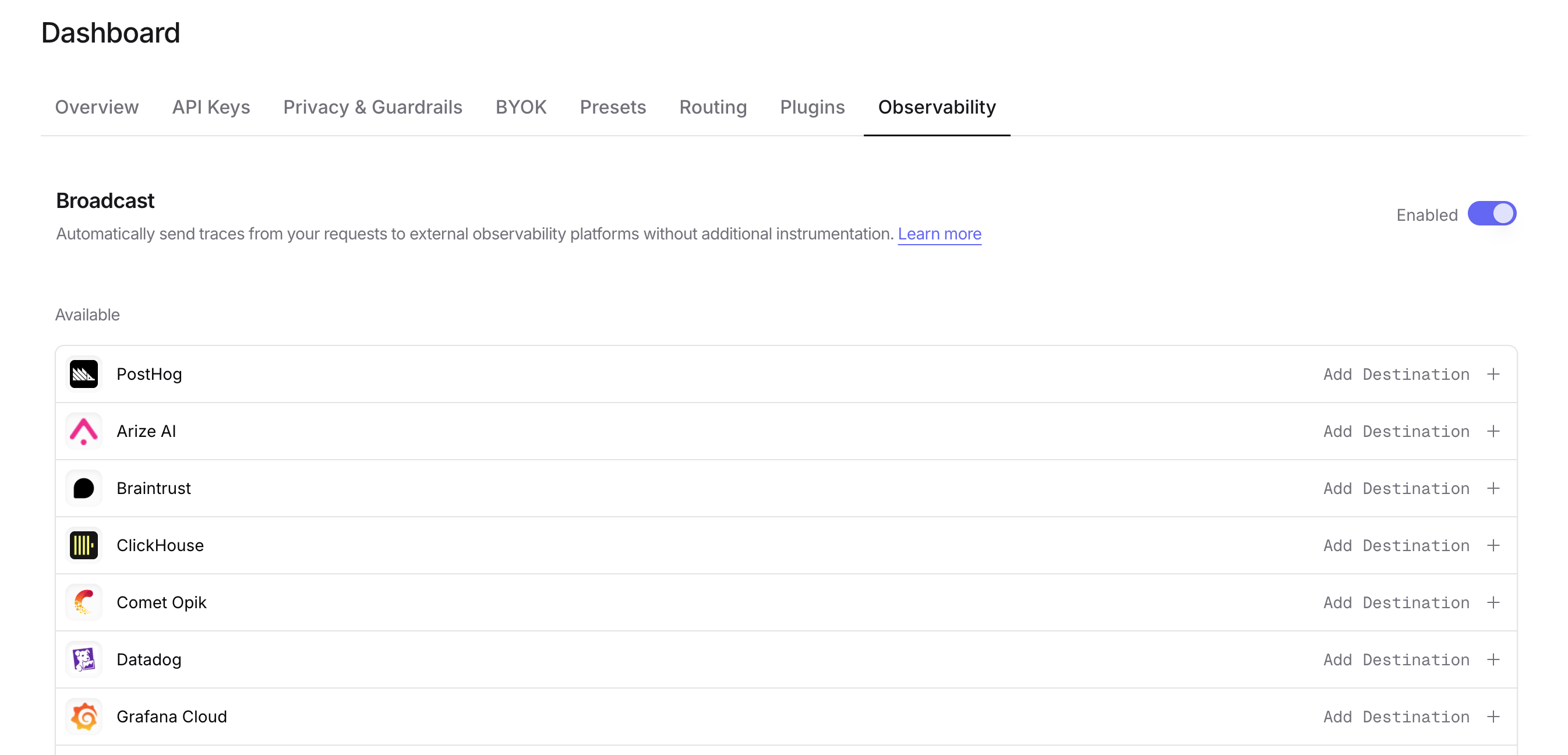
Go to [Settings > Observability](https://openrouter.ai/settings/observability) and toggle **Enable Broadcast**.
 ## Step 3: Configure Raindrop
Click the edit icon next to **Raindrop** and enter:
* **Write Key**: Your Raindrop project write key
* **Base URL** (optional): Default is `https://api.raindrop.ai`. Change only if using a custom endpoint
## Step 4: Test and save
Click **Test Connection** to verify the setup. The configuration only saves if the test passes.
## Step 5: Send a test trace
Make an API request through OpenRouter and view the event in your Raindrop dashboard under **Events**.
## Step 3: Configure Raindrop
Click the edit icon next to **Raindrop** and enter:
* **Write Key**: Your Raindrop project write key
* **Base URL** (optional): Default is `https://api.raindrop.ai`. Change only if using a custom endpoint
## Step 4: Test and save
Click **Test Connection** to verify the setup. The configuration only saves if the test passes.
## Step 5: Send a test trace
Make an API request through OpenRouter and view the event in your Raindrop dashboard under **Events**.
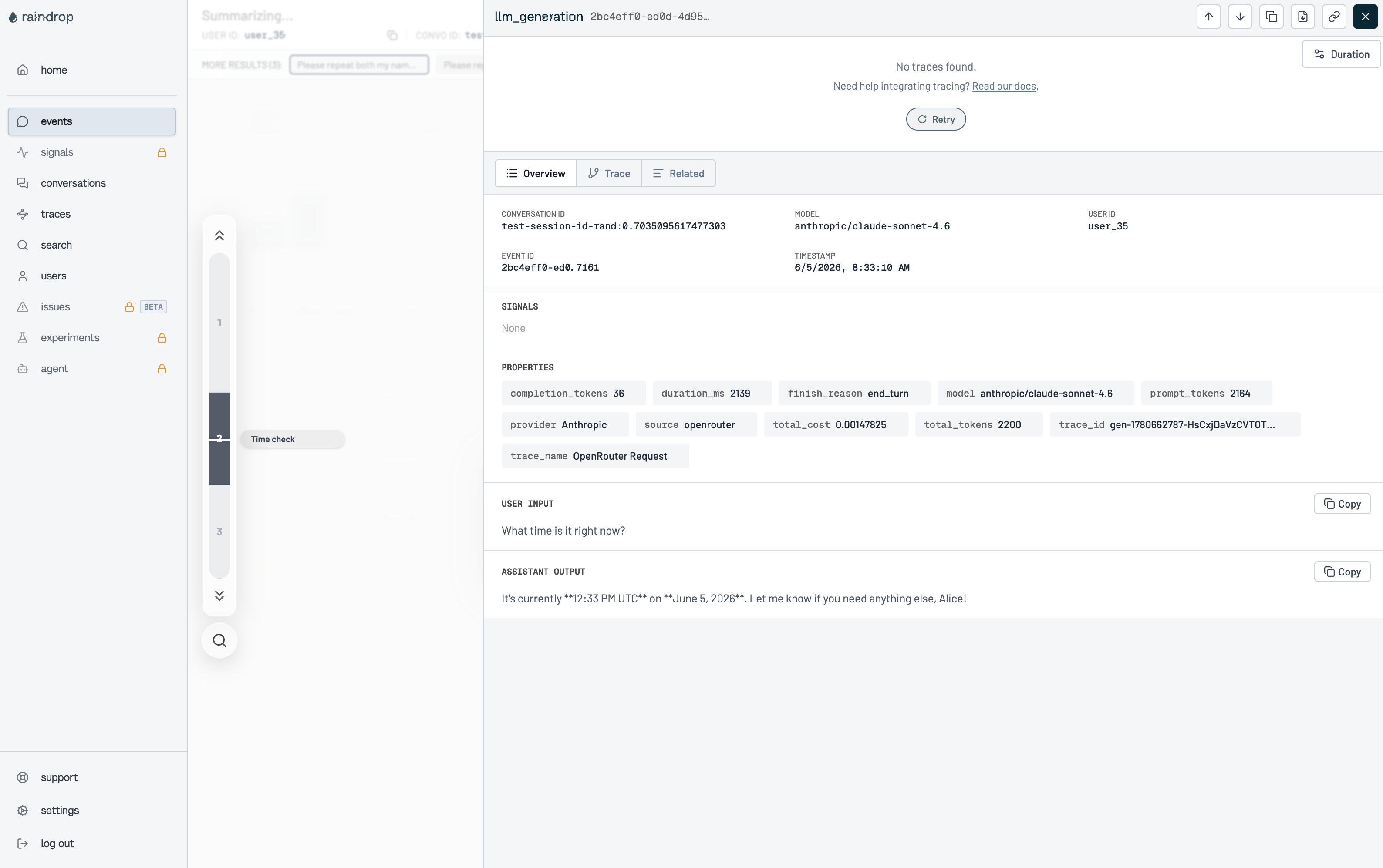 Each event includes:
* **User Input**: The latest user message from the conversation
* **Assistant Output**: The model's completion text
* **Properties**: Token counts, cost, latency, model, provider, and finish reason
## Custom Metadata
Raindrop receives events with custom metadata included as event properties. Use the `trace` field to attach additional context to your events.
### Supported Metadata Keys
| Key | Raindrop Property | Description |
| ------------ | ----------------- | --------------------------------------------------- |
| `trace_id` | `trace_id` | Custom trace identifier for grouping related events |
| `trace_name` | `trace_name` | Name displayed as the event's trace name |
### Example
```json lines theme={null}
{
"model": "anthropic/claude-sonnet-4",
"messages": [{ "role": "user", "content": "What time is it?" }],
"user": "user_35",
"session_id": "session_abc",
"trace": {
"trace_name": "Time Check",
"feature": "assistant"
}
}
```
Every key inside `trace` that is not in the table above is forwarded as-is (e.g. `feature` becomes the property `feature`).
### Additional Context
* The `user` field maps to Raindrop's `user_id` for user-level analytics
* The `session_id` field maps to `convo_id` for grouping conversation turns
* Events include system properties like `model`, `provider`, `total_cost`, `prompt_tokens`, `completion_tokens`, `duration_ms`, and `finish_reason`
## Privacy Mode
When [Privacy Mode](/docs/guides/features/broadcast#privacy-mode) is enabled for this destination, the `input` and `output` fields are excluded from events. All other event data — token usage, costs, timing, model information, and custom metadata — is still sent normally. See [Privacy Mode](/docs/guides/features/broadcast#privacy-mode) for details.
Each event includes:
* **User Input**: The latest user message from the conversation
* **Assistant Output**: The model's completion text
* **Properties**: Token counts, cost, latency, model, provider, and finish reason
## Custom Metadata
Raindrop receives events with custom metadata included as event properties. Use the `trace` field to attach additional context to your events.
### Supported Metadata Keys
| Key | Raindrop Property | Description |
| ------------ | ----------------- | --------------------------------------------------- |
| `trace_id` | `trace_id` | Custom trace identifier for grouping related events |
| `trace_name` | `trace_name` | Name displayed as the event's trace name |
### Example
```json lines theme={null}
{
"model": "anthropic/claude-sonnet-4",
"messages": [{ "role": "user", "content": "What time is it?" }],
"user": "user_35",
"session_id": "session_abc",
"trace": {
"trace_name": "Time Check",
"feature": "assistant"
}
}
```
Every key inside `trace` that is not in the table above is forwarded as-is (e.g. `feature` becomes the property `feature`).
### Additional Context
* The `user` field maps to Raindrop's `user_id` for user-level analytics
* The `session_id` field maps to `convo_id` for grouping conversation turns
* Events include system properties like `model`, `provider`, `total_cost`, `prompt_tokens`, `completion_tokens`, `duration_ms`, and `finish_reason`
## Privacy Mode
When [Privacy Mode](/docs/guides/features/broadcast#privacy-mode) is enabled for this destination, the `input` and `output` fields are excluded from events. All other event data — token usage, costs, timing, model information, and custom metadata — is still sent normally. See [Privacy Mode](/docs/guides/features/broadcast#privacy-mode) for details.